
Radoslav Chobanov
Full-Stack Engineer | Website Builder | Python Automation


I offer comprehensive, end-to-end solutions tailored to your business needs. Choose from my specialized service offerings:
Digital Presence Engineering
Complete web solutions from concept to deployment
- ✓ Custom website development
- ✓ Domain & hosting management
- ✓ DevOps & CI/CD setup
- ✓ Ongoing maintenance & support
- ✓ SEO & performance optimization
End-to-End Automation Solutions
Python-powered automation & data engineering
- ✓ Business process automation
- ✓ Data pipelines & ETL systems
- ✓ Integration with existing tools
- ✓ Custom automation scripts
- ✓ Monitoring & maintenance
Backend Development Services
Scalable APIs & robust server solutions
- ✓ REST API development
- ✓ Microservices architecture
- ✓ Database design & optimization
- ✓ Cloud deployment (AWS, GCP, Azure)
- ✓ Security & performance tuning
Ready to discuss your project? Get in touch
Your Complete Digital Identity Solution
I don't just build websites—I create comprehensive digital presences. From initial concept through deployment and beyond, I handle every aspect of bringing your business online.
What's Included
Unique, responsive designs tailored to your brand and business goals. Modern frameworks, clean code, and user-friendly interfaces.
I handle domain registration, DNS configuration, SSL certificates, and reliable hosting setup—so you don't have to worry about the technical details.
Automated deployment pipelines, version control, monitoring, and infrastructure as code for seamless updates and reliability.
Regular updates, security patches, performance monitoring, and technical support to keep your site running smoothly.
My Process
- Discovery: Understanding your business, goals, and target audience
- Design & Planning: Creating wireframes and technical architecture
- Development: Building your custom solution with modern best practices
- Deployment: Setting up hosting, domains, and going live
- Maintenance: Ongoing support, updates, and optimization
Related Projects
This portfolio website is an example of my web development work—featuring responsive design, optimized performance, and modern tech stack.
Streamline Your Business with Intelligent Automation
I build complete automation solutions that don't just run once—they become integral parts of your workflow, handling repetitive tasks, processing data, and integrating with your existing systems.
What I Automate
Automate repetitive tasks: data entry, report generation, email workflows, file processing, and more.
Build pipelines to extract, transform, and load data from multiple sources. Clean, process, and organize data for analysis.
Connect different tools and platforms: CRMs, databases, APIs, spreadsheets, and third-party services.
Automated monitoring systems that notify you of issues, track KPIs, and generate regular reports.
Example Use Cases
- Automated data extraction from websites and APIs for market research
- Custom bots for task management and team notifications
- Data pipeline for consolidating information from multiple sources
- Automated report generation and distribution
- Integration between different business tools (Jira, Slack, databases, etc.)
Tech Stack
Related Projects
Check out qBot and Beating Blackjack in my portfolio for examples of automation and data processing work.
Robust, Scalable Backend Solutions
I design and build the server-side infrastructure that powers modern applications—from RESTful APIs to complex microservices architectures.
What I Build
Clean, well-documented APIs following industry best practices. Authentication, rate limiting, and comprehensive error handling.
Scalable, maintainable systems with properly separated concerns. Service discovery, message queues, and containerization.
Efficient database schemas, optimization for performance, migrations, and backup strategies.
Deploy to AWS, Google Cloud, or Azure. Infrastructure as code, auto-scaling, and monitoring.
Key Capabilities
- Authentication & Security: JWT, OAuth, role-based access control
- Real-time Features: WebSockets, Server-Sent Events, pub/sub patterns
- Performance: Caching strategies, query optimization, load balancing
- Testing: Unit tests, integration tests, CI/CD pipelines
- Documentation: OpenAPI/Swagger specs, clear API documentation
Tech Stack
Related Projects
My game backend systems (Firebase, PlayFab integration) demonstrate scalable architecture and real-time data synchronization.
Hello there! I'm an outgoing and passionate engineer with a diverse background spanning game development, backend engineering, Python automation, and DevOps practices.
Currently, I specialize in building robust backend systems, automating complex workflows with Python, and implementing DevOps solutions that streamline development processes. My experience in game development has given me a unique perspective on performance optimization, real-time systems, and scalable architectures.
I'm driven by the desire to solve challenging technical problems, whether it's architecting microservices, building automation tools, or optimizing deployment pipelines. My game development background fuels my creativity in approaching system design and infrastructure challenges.
Beyond coding, you'll find me exploring new technologies, contributing to open-source projects, or diving deep into strategy games, MOBAs, and RPGs. I believe in continuous learning and pushing the boundaries of what's possible with technology.
When I'm not at the keyboard, I enjoy playing guitar, reading technical books and sci-fi, staying active through regular exercise, and experimenting in the kitchen. I'm also passionate about traveling and experiencing different cultures, which helps me approach problems from diverse perspectives.
Programming Languages
Backend & APIs
Automation & Data
Databases
DevOps & Cloud
Game Development

SysLens
KDE Plasma 6 system monitor widget — real-time CPU, GPU, memory, disk, network & battery metrics

PlasmaCodexBar
KDE Plasma 6 tray widget monitoring AI subscription usage across Claude, Codex, Gemini, Copilot, Cursor and OpenRouter

PlasmaNGenuity
Linux replacement for HyperX NGenuity — full DPI, LED, button remapping and macro configuration for the Pulsefire Dart

CampusBase
Full-stack school management system with multi-tenancy support
qBot
Containerized Python Discord bot with moderation, utilities, and CI/CD automation

Beating Blackjack
Statistical analysis and simulation proving whether mathematical strategy beats the house

Angry Cube
Physics-based puzzle game with creative mechanics

Drawy
Interactive drawing and creativity game application

TFT 2D
2D tactical fighting game with strategic elements

The Voodoo
Magic-based action game with spell-casting mechanics
More projects coming soon...
Let's Build Something Great Together
Have a project in mind? Looking for a reliable technical partner? I'd love to hear from you.



Response Time: I typically respond within 24 hours on business days
Ready to Start?
Whether you need a complete digital presence, automation solutions, or backend development—I'm here to help turn your ideas into reality.
Send Me a Message →Enterprise School Management Platform
CampusBase is a comprehensive, full-stack school management system designed to streamline campus operations for educational institutions. Built with modern technologies and best practices, it provides a robust foundation for managing students, employees, courses, finances, and administrative tasks with multi-tenancy support.
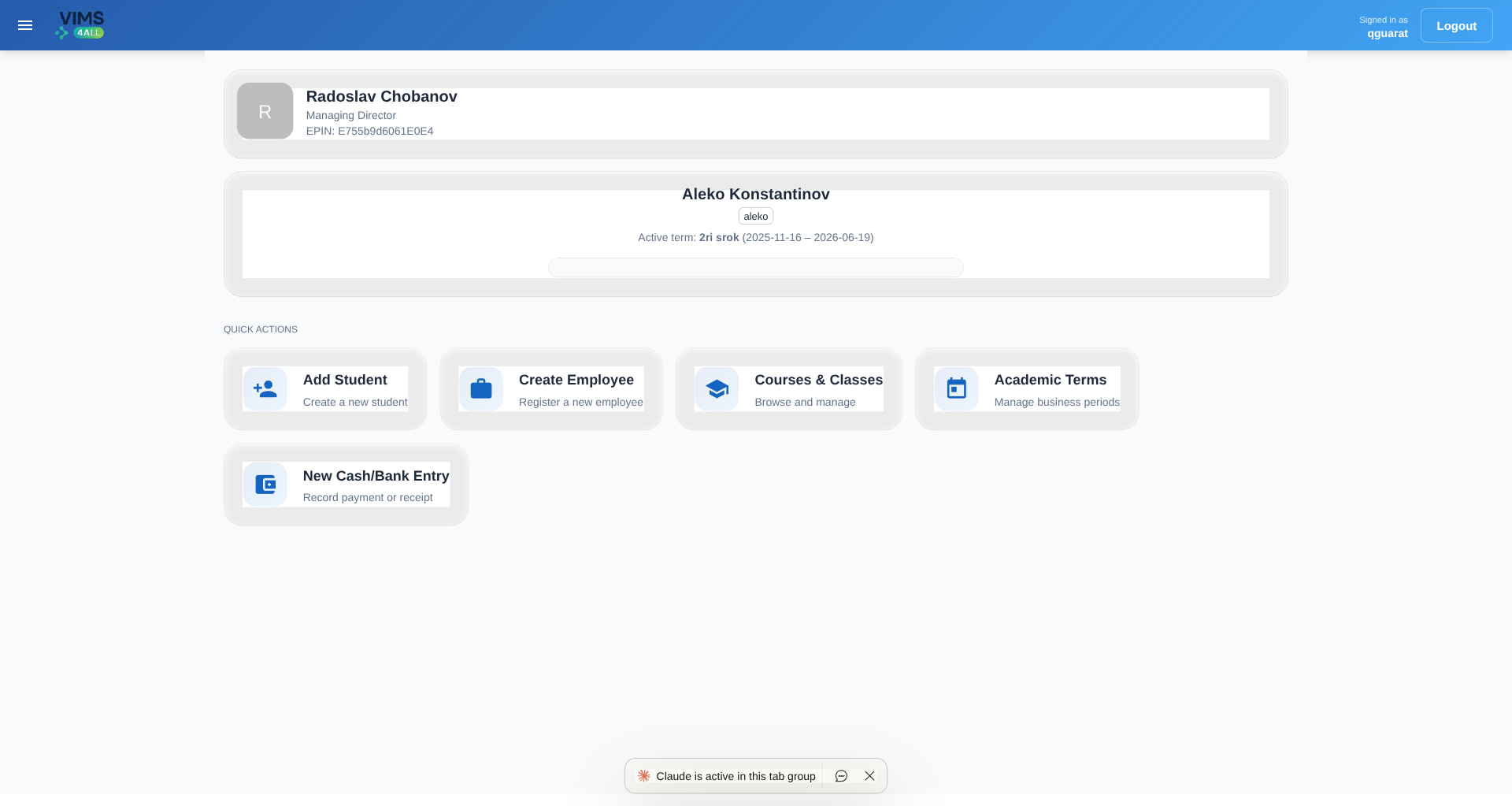 Dashboard — institute overview & quick actions
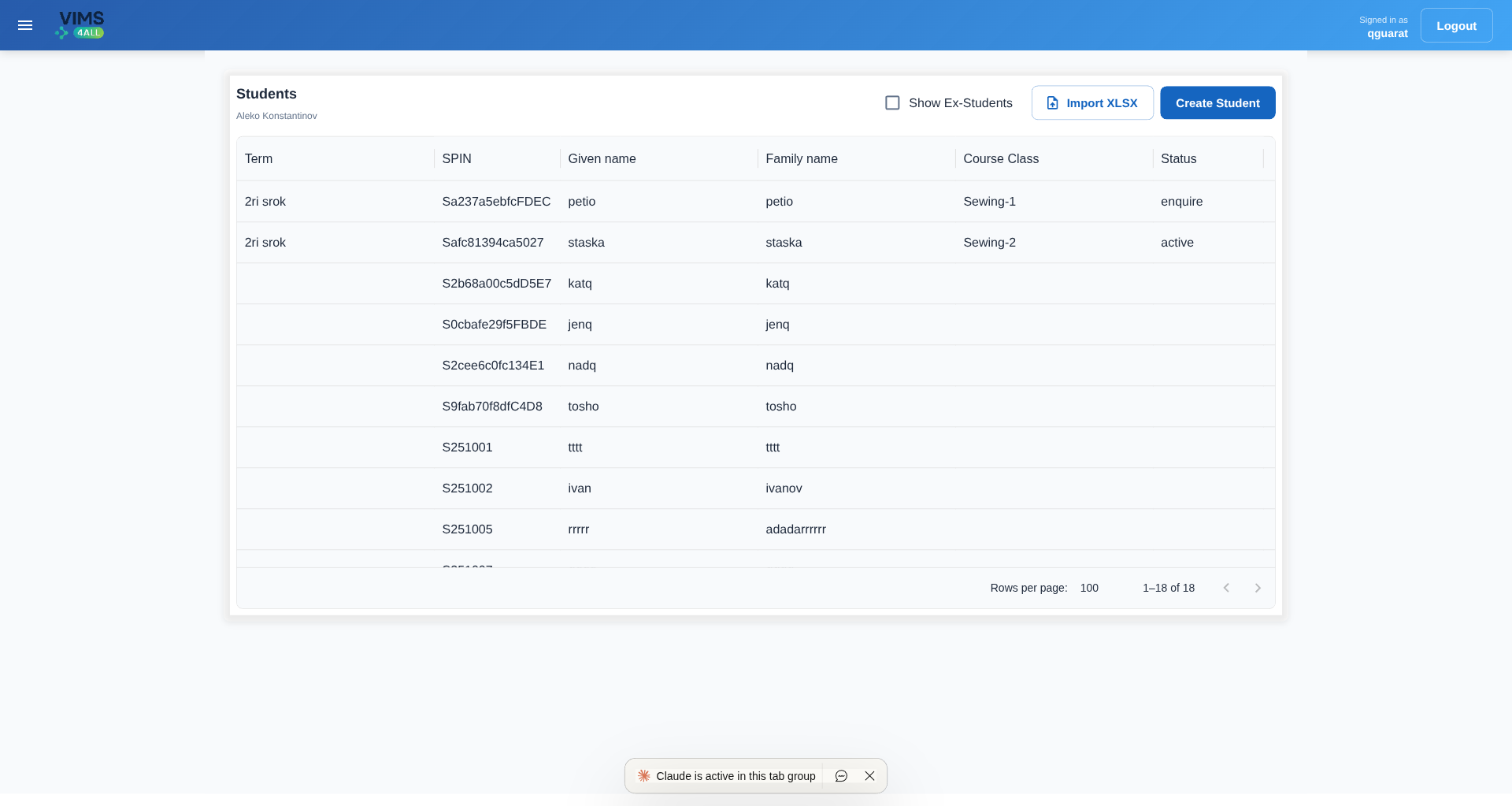 Student management
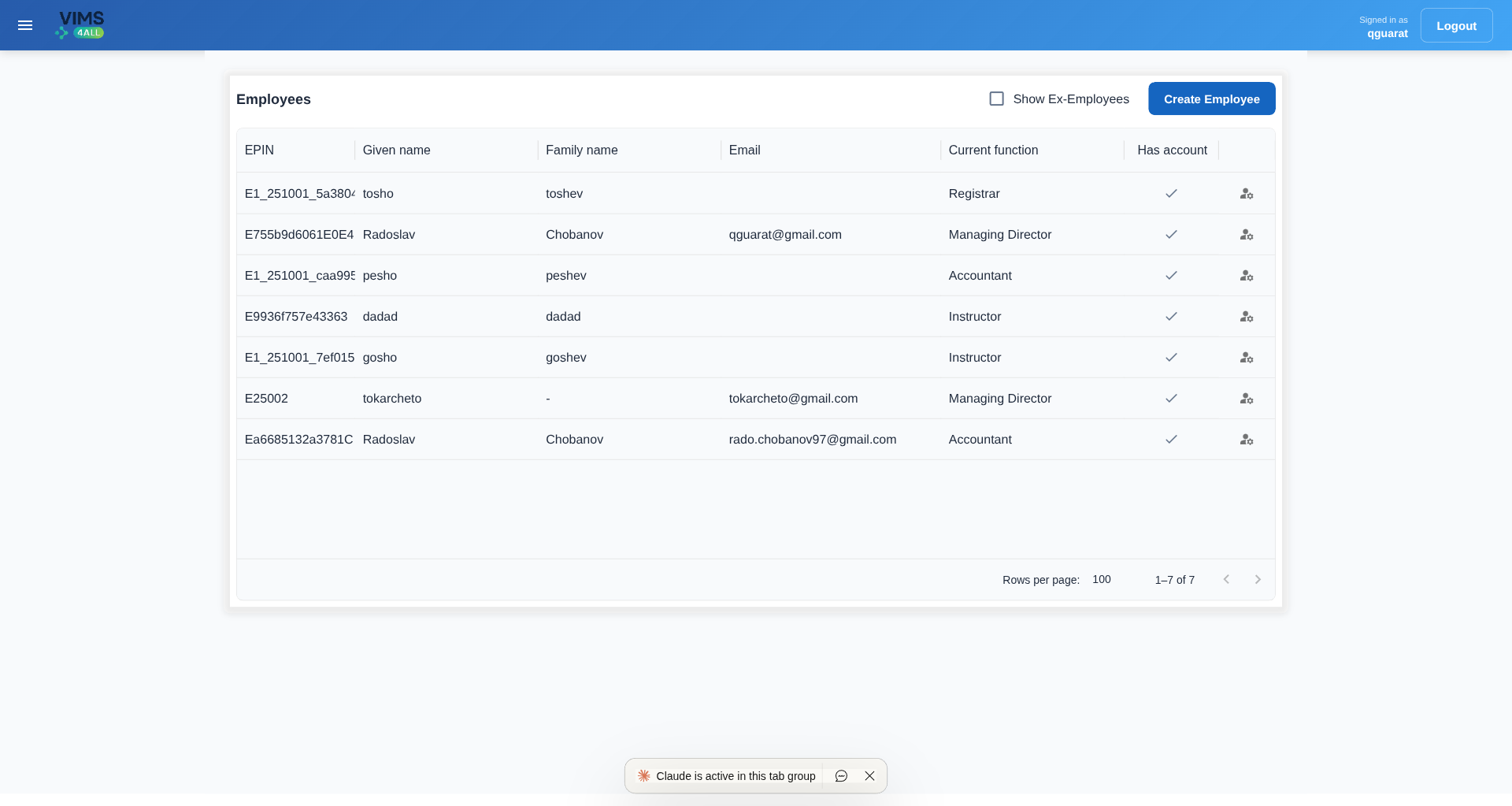 Employee & HR management
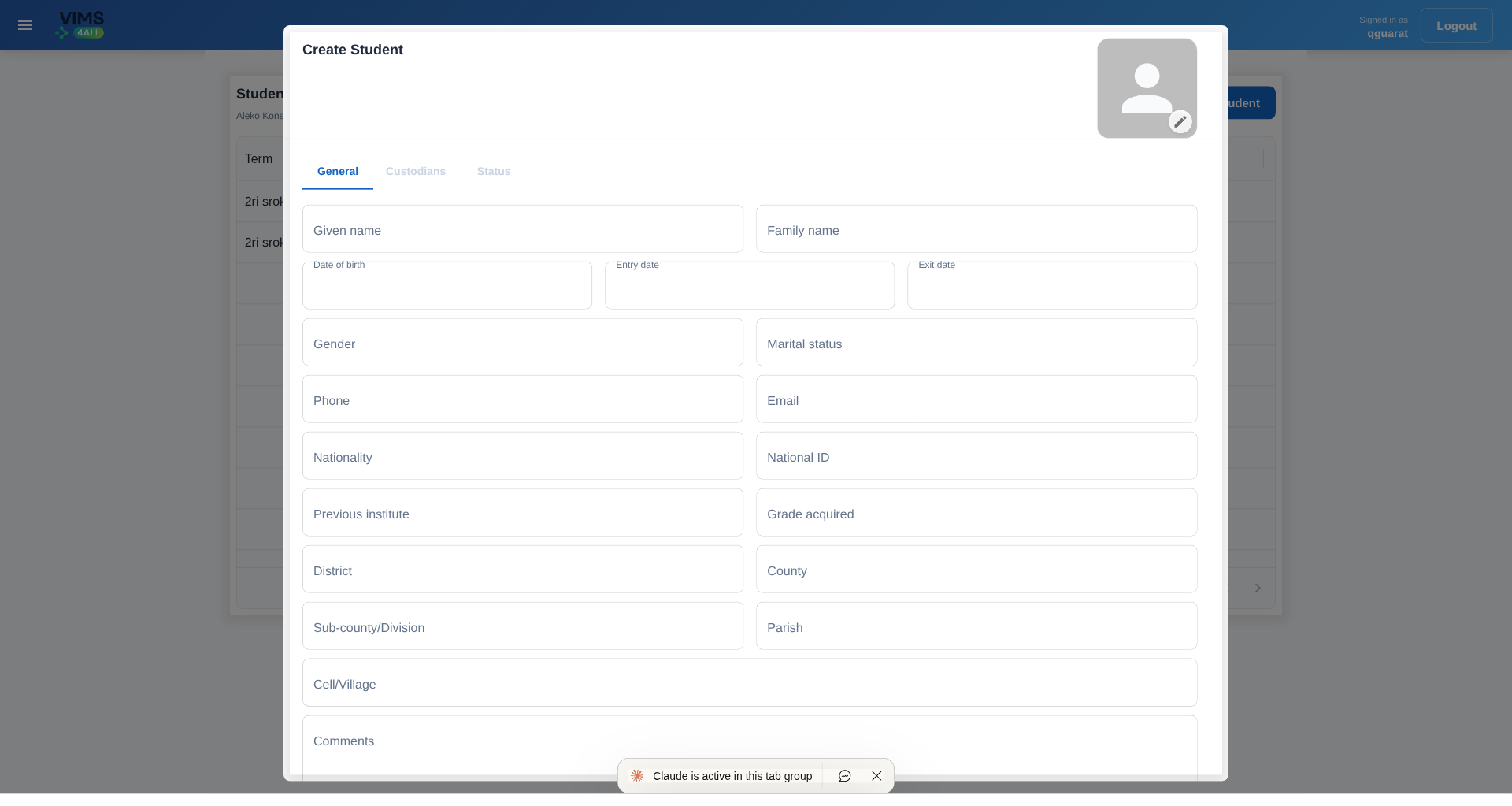 Student registration form
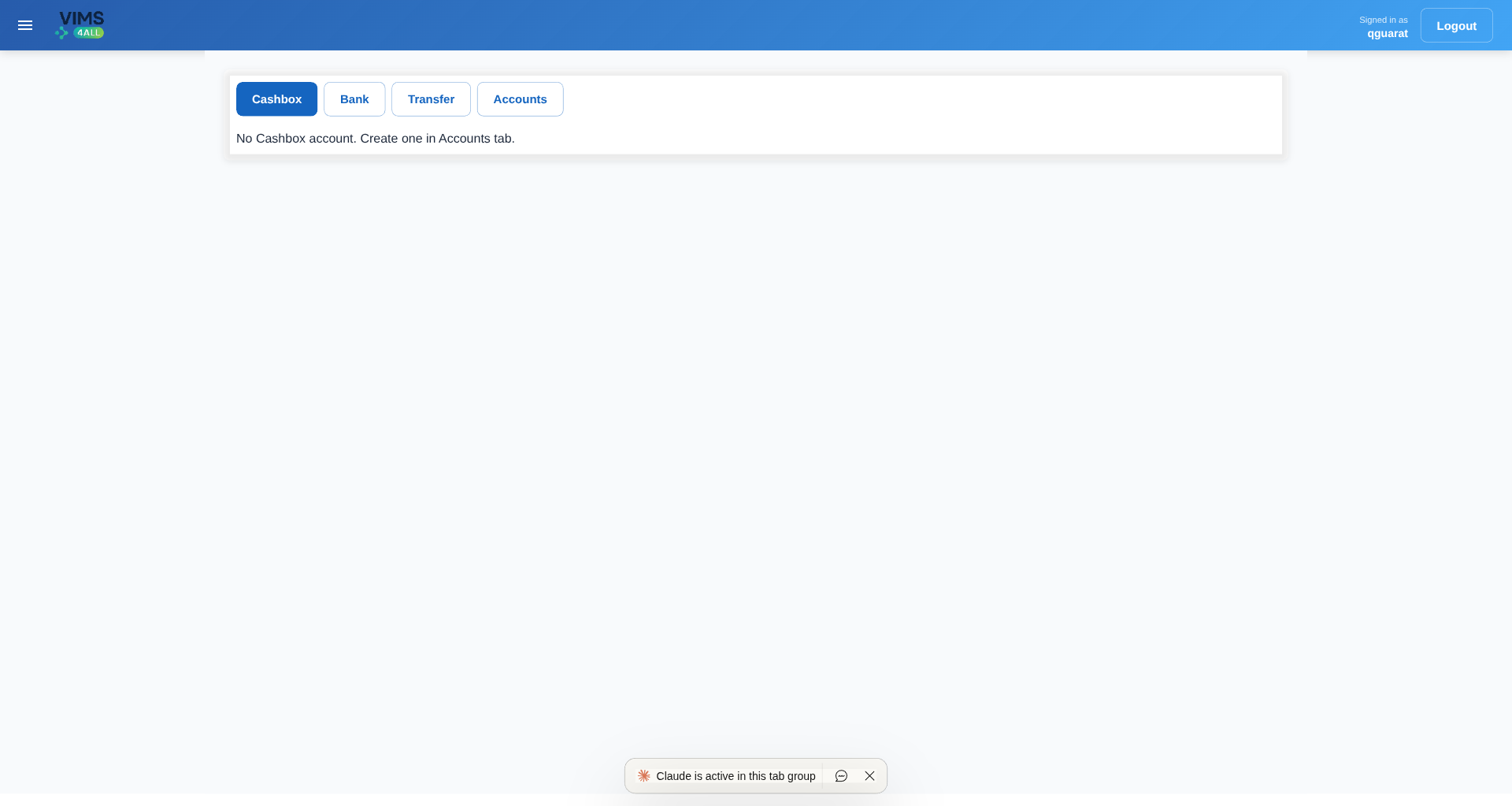 Finance module
Key Features
Complete student lifecycle management including enrollment, status tracking, custodian information, and academic records. Automated PIN generation for unique student identification.
Employee records, function assignments (director, registrar, instructor, accountant), career progression tracking, dependent management, and automated account closure on exit dates.
Course catalog, class scheduling, instructor assignments, academic term management, and comprehensive course registration system.
Multi-account financial system with account types, ledger entries, transaction tracking, and role-based access for accountants and directors.
Institute-level data isolation ensuring complete separation between different schools/campuses. Automatic query scoping via custom middleware and managers.
Granular permissions system with superuser, institute admin, and employee roles. Function-based access control for specific operations (director, registrar, accountant, instructor).
Technical Architecture
Backend (Django REST Framework)
- Framework: Django 5.1 with Django REST Framework
- API Documentation: Auto-generated OpenAPI schema via drf-spectacular with Swagger/ReDoc interfaces
- Authentication: JWT-based authentication using SimpleJWT
- Database: PostgreSQL with advanced query optimization and connection pooling
- File Storage: MinIO (S3-compatible) for media and document management
- Custom Managers: InstituteScopedManager and OptionallyScopedManager for automatic data filtering
- Middleware: Custom InstituteContextMiddleware for request-level tenant isolation
Frontend (React + TypeScript)
- Framework: React 18 with TypeScript for type-safe development
- Build Tool: Vite for lightning-fast development and optimized production builds
- UI Library: Material-UI (MUI) with custom theming and components
- Routing: React Router v7 with role-based route protection
- State Management: Context API for authentication and global state
- Type Generation: Automated TypeScript type generation from OpenAPI schema
- Data Grid: MUI X Data Grid for advanced table operations and data visualization
DevOps & Infrastructure
My Development Process
- Requirements Analysis: Worked with client to understand complex educational institution workflows and data requirements
- Database Design: Designed normalized database schema with proper relationships and constraints for academic data
- API Architecture: Implemented RESTful API with comprehensive endpoints following OpenAPI standards
- Multi-Tenancy Implementation: Built custom middleware and managers for automatic institute-level data scoping
- Frontend Development: Created responsive, user-friendly interface with role-based views and permissions
- Type Safety: Implemented automated type generation pipeline ensuring frontend-backend consistency
- Testing & Deployment: Set up development and production environments with Docker containerization
Project Modules
- Accounts: User authentication, authorization, and profile management
- Institutes: Organization-level configuration and settings
- Students: Student enrollment, status tracking, custodian records
- Employees: HR management, function assignments, career progression
- Courses: Course catalog, class scheduling, instructor assignments
- Terms: Academic year and term management
- Finance: Account management, ledger entries, financial reporting
Technical Highlights
- Automated PIN Generation: Race-condition-free monotonic counter system for unique student/employee identifiers
- Smart Account Management: Automatic account closure when employee exit dates arrive with startup hooks
- Type-Safe Development: End-to-end TypeScript types auto-generated from backend schema
- Scalable Architecture: Supports multiple institutes with complete data isolation
- Developer Experience: Comprehensive Makefile commands for streamlined development workflow
- API Documentation: Interactive Swagger/ReDoc interfaces for API exploration and testing
Tech Stack Summary
Private client project — repository not publicly available. Interested in a similar system? Let's talk.
Track Your AI Subscription Quotas from the KDE Plasma Tray
PlasmaCodexBar is a native KDE Plasma 6 system tray widget that brings AI subscription quota monitoring directly to your desktop. Inspired by CodexBar for macOS, it provides real-time session and weekly usage tracking across six AI providers — with color-coded progress bars, expense estimates, and direct links to provider dashboards — all without leaving your workflow.
Supported AI Providers
Full OAuth integration via Claude Code CLI. Tracks session usage (5-hour window with reset countdown), weekly quota, per-model breakdowns (Sonnet, Opus), and local expense estimates calculated from session JSONL files.
OAuth and API key support. Tracks credits balance, plan type (Free / Plus / Pro / Team / Enterprise), weekly usage, and unlimited status detection.
Adapter-based providers normalized to the same standard interface via the _AdapterBridge pattern, enabling future providers to be added with minimal code.
Widget Features
- Robot icon in system tray — click to expand the full usage dashboard
- Provider tabs — switch between Claude, Codex, Gemini, Copilot, Cursor, OpenRouter at a glance
- Dual view modes — "Usage" (quota bars + reset countdowns) and "Stats" (pace, cost estimates) for Claude and Codex
- Color-coded bars — green → yellow → red as quota fills up
- Expense estimates — local token counting against current Anthropic/OpenAI pricing; no external calls
- Adaptive polling — configurable refresh interval (default 5 minutes) with rate-limit awareness
- Direct dashboard links — one click to the provider portal from within the widget
Technical Architecture
Python Backend
- OAuth flows — Claude via
~/.claude/.credentials.json; Codex via~/.codex/auth.jsonwith 8-day token refresh cycle - Claude cost calculation — Opus 4.5 ($15/$75 per 1M tokens), Sonnet 4.5 ($3/$15); extracted directly from
~/.claude/projects/**/*.jsonl - ProviderStats dataclass — unified interface carrying utilization %, reset times, plan info, and pace metrics across all providers
- Adapter pattern —
_AdapterBridgenormalizes external providers to the same dataclass; adding a new provider requires only an adapter - Dependencies: PyGObject ≥ 3.42, pycairo ≥ 1.20, GTK3 bindings — all system packages, no pip installs
QML Frontend
- KDE Plasma 6 native — Repeater-based dynamic tab generation; dual compact icon / full widget representations
- Configurable via KDE settings — enabled providers and refresh interval stored in
~/.config/ai-usage-monitor/main.xml(KConfigXT format) - Install methods:
./install.sh, KDE Store, orkpackagetool6direct install
Tech Stack
Available on GitHub and the KDE Store. Contributions and new provider adapters welcome.
Full Linux Replacement for HyperX NGenuity
PlasmaNGenuity is an open-source Linux substitute for HyperX's Windows-only NGenuity software. It provides native configuration of the HyperX Pulsefire Dart wireless gaming mouse through both a KDE Plasma 6 system tray widget and a standalone PyQt5 application — exposing every feature NGenuity offers, on Linux, without a VM.
Configuration Capabilities
Five independent DPI profiles with adjustable sensitivity from 50 to 16,000 DPI and per-profile color customization for the on-device LED indicator.
Static, breathing, spectrum, and trigger lighting modes for both the logo and scroll wheel, configurable per-profile.
All six mouse buttons remappable to mouse functions, keyboard shortcuts, media controls, or DPI switching actions.
Record custom key sequences with adjustable per-step delays and assign them to any button.
Adjustable report rate from 125 Hz to 1000 Hz directly from the UI.
Real-time battery percentage with color-coded tray indicator (green → yellow → orange → red), charging status, connection mode, firmware version, and voltage readings. Hotplug detection via udev for automatic device recognition.
Technical Architecture
HID Communication Layer
- Supported devices: HyperX Pulsefire Dart wireless dongle (USB 0951:16E1) and wired/direct mode (USB 0951:16E2)
- Protocol implementation: custom HyperX HID protocol in
drivers/hyperx/protocol.py(15,698 bytes); covers full feature set reverse-engineered from the original software - hidapi for cross-platform HID device access; pyudev for hotplug detection
- udev rules (
99-plasmangenuity.rules) installed for non-root device access
Application Architecture
- Layered design: Core manager → Driver interface → HyperX driver → HID provider / sysfs / UPower providers
- Standalone app: PyQt5 system tray with left-click config panel, right-click context menu, animated charging indicator, and CLI tool with JSON output for scripting
- Plasma widget: QML tray widget with real-time battery display and direct panel access — same feature set, native Plasma integration
- UPower integration for system-level battery/power information alongside direct device reads
Distribution Options
- Plasma widget:
./install-plasmoid.shor pre-built.plasmoidpackage - Full app via pip:
pip install "plasmangenuity[tray]" - Arch Linux / Manjaro: PKGBUILD included for pacman
- Waybar module: shell script for Waybar status bar integration
Tech Stack
Open source and actively maintained. Issues and contributions welcome — especially support requests for other HyperX models.
Containerized Discord Bot with Automation & CI/CD
qBot is a Python-based Discord bot built for long-term maintainability. It runs fully containerized via Docker, ships with a development compose stack, and uses GitHub Actions for automated testing and deployment — making it easy to iterate and keep running reliably.
Features
Server moderation commands, utility helpers, and automation tasks designed to reduce manual administration overhead in Discord communities.
Fully containerized application with a docker-compose-dev.yml for local development and a production-ready Dockerfile for clean, reproducible deployments.
GitHub Actions workflows handle automated testing and deployment, ensuring every push is validated before reaching production.
Python dependencies pinned via requirements.txt for consistent, conflict-free environments across development and production.
Technical Details
- Language: Python — 96.6% of the codebase
- Library: discord.py for bot event handling and slash command registration
- Containerization: Docker with separate dev and prod compose configurations
- CI/CD: GitHub Actions for automated lint, test, and deployment workflows
- Successor to: qguaratBot (C# implementation) — rebuilt in Python for better ecosystem support and long-term maintainability
Tech Stack
Browse the source code and contribution history on GitHub.
Does Mathematical Strategy Actually Beat the House?
A data-driven investigation into whether basic strategy and card counting techniques produce a statistically significant advantage in blackjack. Built entirely in Jupyter Notebook with Python, this project quantifies the difference between random play, basic strategy, and card counting through extensive simulation and probability modeling.
What Was Investigated
Evaluation of standard blackjack basic strategy — the mathematically optimal play for every hand combination — and how much it reduces the house edge compared to random decisions.
Statistical assessment of card counting techniques, measuring the edge gained when tracking deck composition and adjusting bet sizing accordingly.
Precise probability modeling of winning odds under different rule sets, deck sizes, and player decisions — making the math behind every recommendation visible.
Large-scale simulation runs comparing random play, basic strategy, and card counting head-to-head across thousands of hands to produce statistically reliable results.
Technical Approach
- Platform: Jupyter Notebook — 98.6% of the codebase; Python for simulation logic
- Methodology: Monte Carlo simulation over large hand samples to minimize variance and surface true expected values
- Analysis scope: Basic strategy effectiveness, card counting advantage, probability-based decision trees, house edge quantification
- Output: Charts and statistical summaries comparing strategies across thousands of simulated hands
Topics
Full analysis, simulation code, and results are available on GitHub.
Real-Time System Monitoring Widget for KDE Plasma 6
SysLens is a dark, futuristic system monitoring widget built natively for KDE Plasma 6. It delivers real-time visualization of seven subsystems — CPU, RAM, GPU, disk I/O, network, battery, and processes — through a compact, expandable panel popup. Zero external Python dependencies; all data is read straight from the Linux kernel via /proc and /sys.
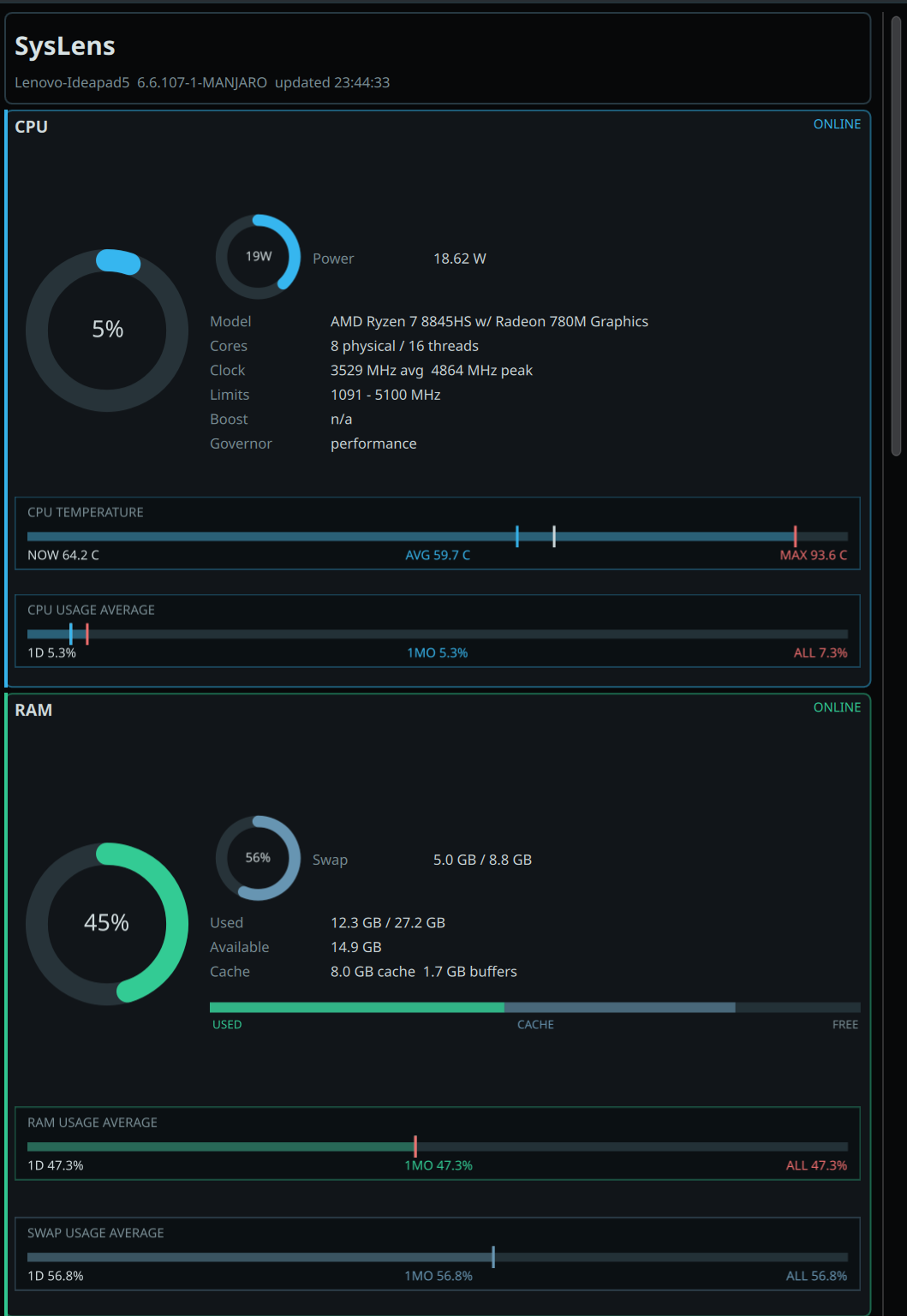 CPU usage, temperature, power gauge & RAM breakdown with historical averages
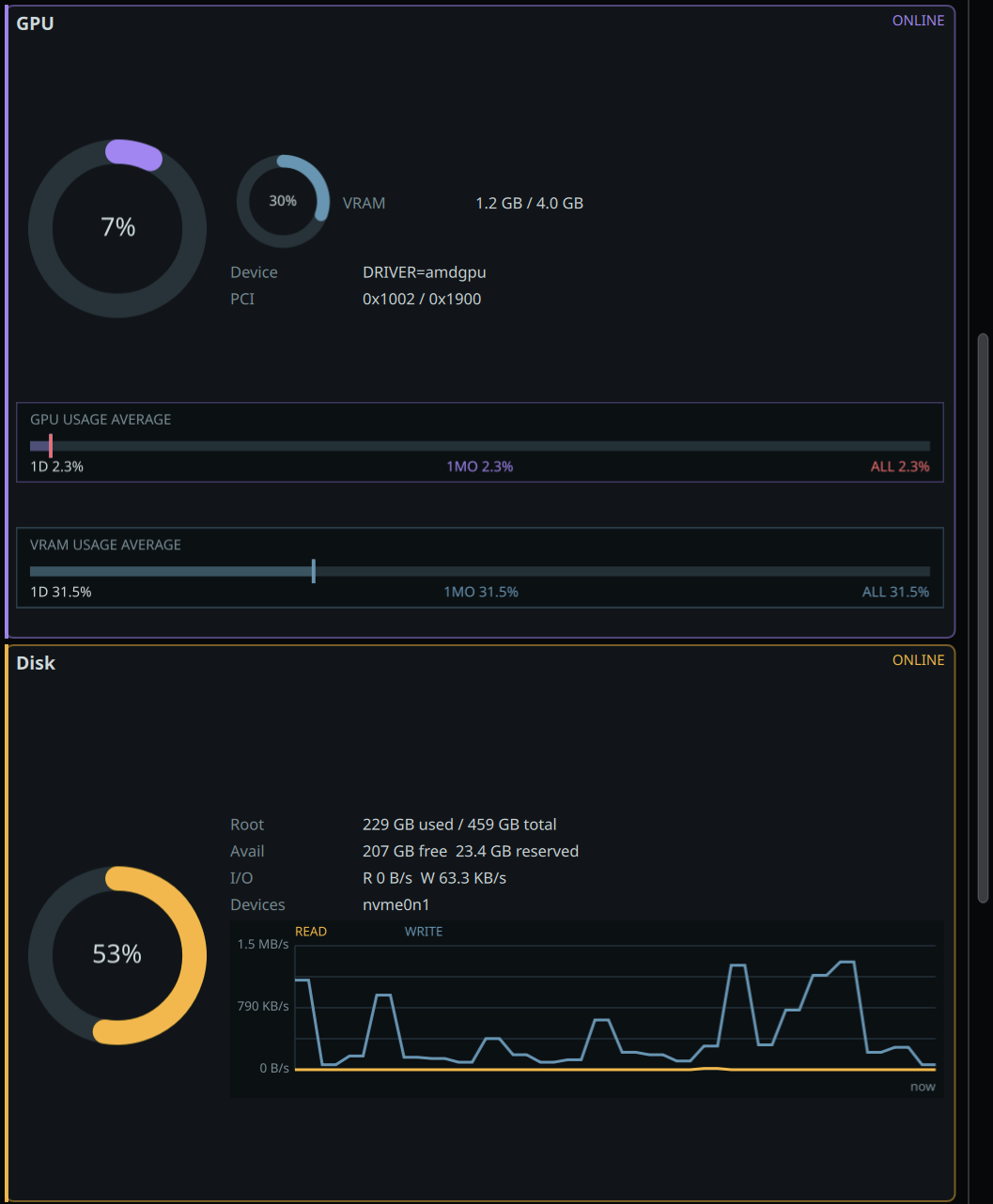 GPU / VRAM metrics & disk I/O throughput
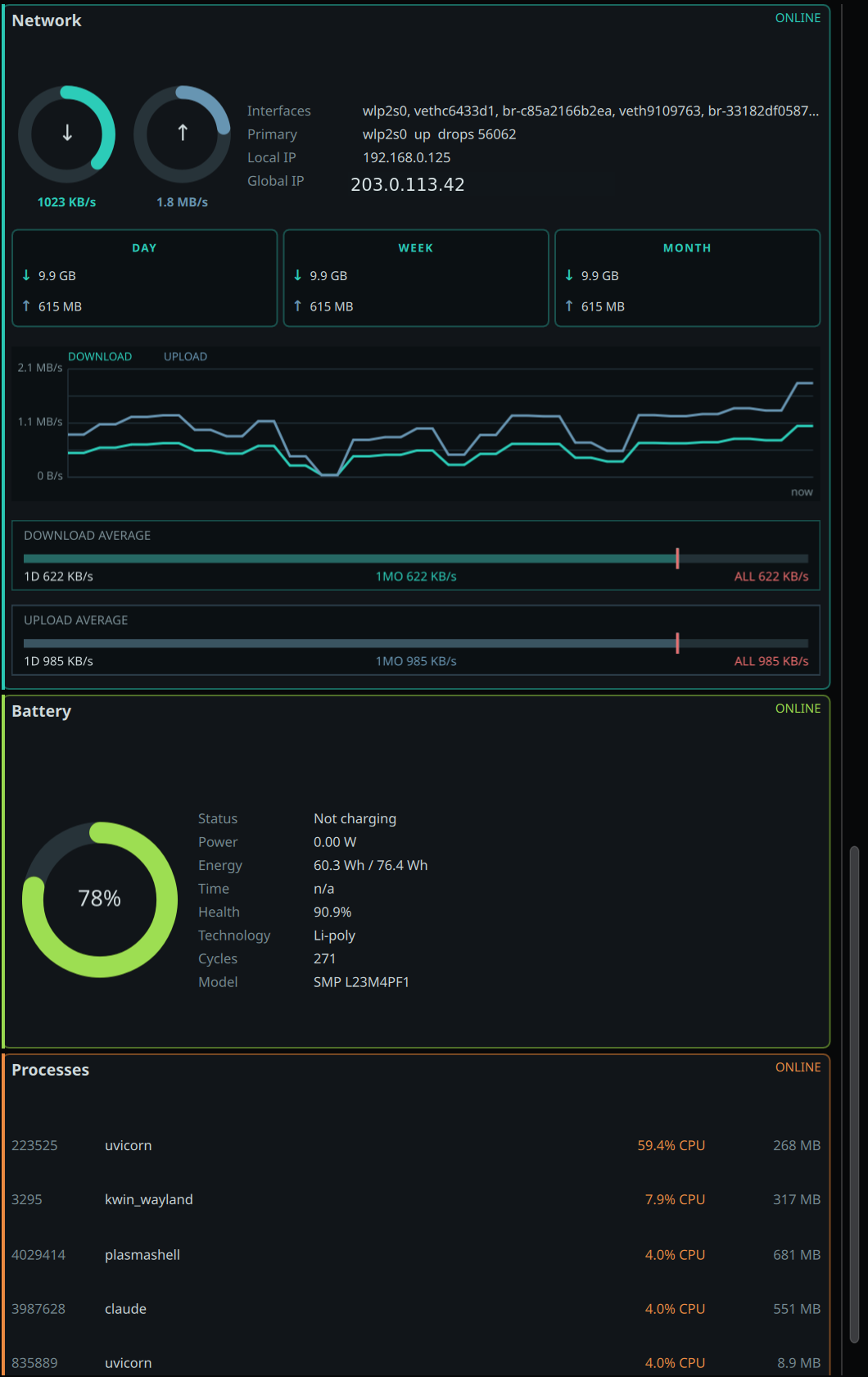 Network traffic history, battery health & top processes
Monitoring Sections
Donut usage chart, session-relative power gauge, temperature bar, and configurable short/long-window usage averages.
RAM donut chart, stacked breakdown bar (used / cache / free), swap tracking, and 1-day / 30-day historical averages.
GPU usage metrics, VRAM secondary gauge, and historical tracking across configurable time windows.
Live read/write line charts, throughput visualization, IOPS tracking, and root filesystem usage monitoring.
Live upload/download speed donuts, traffic history, daily / weekly / monthly aggregates, and per-interface monitoring with virtual interface filtering.
Charge level, power status (charging / discharging), health percentage, cycle count, voltage and current readings.
Top CPU consumers with configurable list limit, real-time CPU and memory usage per process, live-sorted ranking.
Technical Architecture
Python Backend
- Zero external dependencies — standard library only, no pip installs required
- Direct kernel access — reads
/proc/stat,/proc/meminfo,/proc/diskstats,/proc/net/dev,/sys/class/hwmon/,/sys/class/power_supply/and more; no daemon required - Functional architecture — modular per-subsystem collection functions, no class hierarchy
- Stateful persistence — usage averages survive widget restarts via
~/.local/state/syslens/state.json; boot ID tracking resets history on kernel reboots - Data pipeline — before-snapshot → CPU sampling window → after-snapshot → delta computation → historical aggregation → JSON output
- Performance — history arrays capped at 48 items; configurable update interval from 1 to 10 seconds
QML Frontend
- KDE Plasma 6 native — built with Kirigami 2 and Qt Controls, integrates as a panel popup widget via
kpackagetool6 - Reactive data flow — JSON from Python backend drives the UI through a single
ingest()function keeping all panels in sync - Custom visualization components — DonutChart, LineChart, MarkerSummaryBar, RamBreakdownBar — all implemented from scratch in QML
- Configurable — update interval, per-section visibility toggles, and process list limit all accessible from the right-click menu
- Dark theme native — designed for Plasma's dark palette, no additional theming required
Visualization Components
- DonutChart — arc gauge for percentage-based metrics (CPU, RAM, GPU, network speeds)
- LineChart — time-series display for disk I/O and other rate-based data
- MarkerSummaryBar — period comparison markers (short / long / all-time averages)
- RamBreakdownBar — segmented horizontal bar showing used / cached / free memory split
Tech Stack
SysLens is fully open-source. Browse the source, file an issue, or contribute on GitHub.